
Plans
Configure tiers, billing options, pricing, trials, roles, and plan lifecycle behavior.
Plans are the paid tiers your members can buy. Arcalotl uses one plan model everywhere, whether you manage plans from Discord, Fluxer, Telegram, or the dashboard:
- A tier is what members see, such as Pro or VIP.
- A billing option is how that tier is billed: monthly, annual, or one-time.
- An entitlement is what the buyer receives while access is active, usually one or more platform roles. See Entitlements.
When a member pays, Arcalotl grants the tier's entitlements. When access ends, Arcalotl removes them.
If members should choose their own support amount, configure Donations instead of adding another fixed-price plan.
Create a plan from Discord
Run:
/arcalotl plan createDiscord asks you to choose the role members should receive. Arcalotl then opens a modal for:
- Plan name
- Billing mode
- Monthly and optional annual price for recurring plans, or purchase price for one-time plans
- Currency
- Optional multiple-purchase and access-duration settings for one-time plans
- Optional plan hierarchy in
Group:rankformat for recurring plans
See Supported Currencies for the currency codes Arcalotl accepts when creating plans.
Arcalotl can only grant roles below its bot role in Discord's role hierarchy. Move the Arcalotl bot role above your paid roles before creating plans.
Create a plan from Fluxer
Fluxer uses typed values rather than Discord's modal:
/arcalotl plan create role=ROLE_ID name="VIP" monthly=9.99 annual=99.99 currency=usdUse a Fluxer role ID, not a role name. Arcalotl checks the bot's Manage Roles permission and hierarchy before creating the plan. See the Fluxer Command Reference for edit, delete, import, and list syntax.
Create a plan from the dashboard
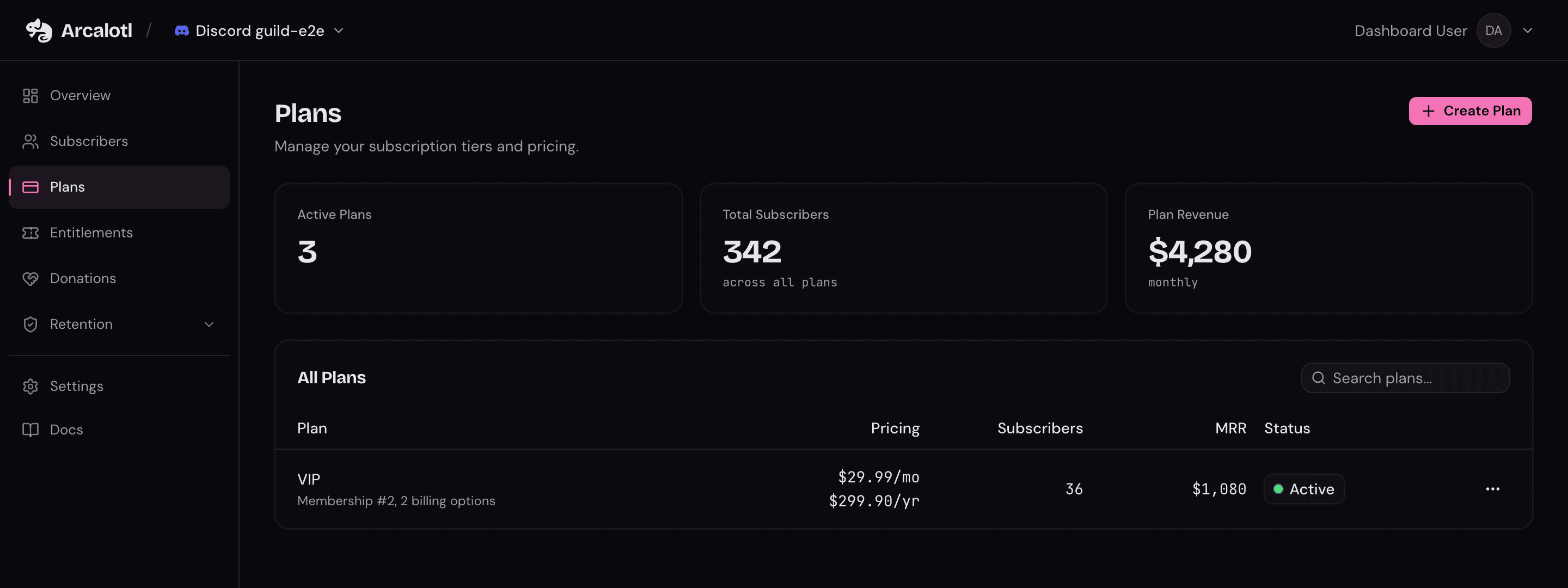
The dashboard Plans page manages the same plan model. Admins can:
- Create a tier with monthly and annual billing options or a one-time price
- Attach an entitlement that defines what buyers receive
- Set free trial days for new recurring subscribers
- Configure whether one-time plans can be bought more than once
- Configure permanent or timed access for one-time plans
- Edit plan names and billing amounts
- Configure upgrade and downgrade groups
- Archive plans that should no longer be sold
Plans go on sale as soon as they are saved. When you edit a billing amount, the new price applies to new purchases; existing subscriptions keep their current price.
Perks
Perks are what a plan gives you, written for the member. Each plan has:
- A tagline, one line under the plan name (up to 120 characters).
- Up to six perks. Each perk is a short title (up to 48 characters) and an optional detail (up to 200 characters). The title is always shown in bold. In the detail you can use
**bold**and*italic*.
Set them from the dashboard: right after you create a plan you are asked for its perks, and you can change them any time from Edit plan. Plans created from Discord, Fluxer or Stoat commands start without perks; add them in the dashboard.
Where perks show
| Surface | What members see |
|---|---|
| Checkout page | The tagline, then every perk as a bold title with its detail under it. On short screens the details are hidden, not the perks. |
| Subscribe card (Discord, Fluxer, Stoat, Telegram) | The tagline and perks under each plan. See When a card is full, below. |
| /subscribe and !subscribe replies | The full pitch for the one plan the member picked, right before the checkout link. |
| Storefront page | The tagline and perks on the plan card. |
| Member portal | The member's current plan with its tagline and perk titles. |
| Hytale in-game store | The tagline and perks on the plan card, as plain text. |
| API and MCP | perks[].title and perks[].detail; features keeps the titles as a flat list. |
Seasoned
For regulars who want their own corner of the server
checkout.features_summary_more
- Custom RolePick a color, icon, and name for your own personal server role (pending approval).
- Your Own IslandOne private text channel and one private voice channel, for you and whoever you want.
- Swim Speed UpYou are immune to slowmode.
- Main Damage UpImage upload and embed permissions in every channel.
checkout.price_recurring
When a card is full
Chat platforms cap message length, and the subscribe card lists every plan in one message. When the full text does not fit, Arcalotl trims every plan on the card the same way, in this order:
- Full: the tagline and every perk with its detail.
- Titles only: details are dropped, every perk stays.
- Tagline only: perks are dropped.
- Compact: name and price.
The detail is dropped before any perk, so put what sells the plan in the title. The reply to /subscribe for a single plan always shows the full pitch.
| Platform | Limit | Plans at full detail |
|---|---|---|
| Discord | 4,000 characters per card | about 5 with typical perks |
| Telegram | 4,096 characters per message | about 5 |
| Fluxer | 1,024 per plan, 6,000 per card | about 6 |
| Stoat | 2,000 bytes per message | about 2 |
| Hytale, checkout, storefront, portal | no cap | all |
"Typical" means four perks with details of about 80 characters. Six perks with 200-character details fit fewer plans, and Stoat and Fluxer then show titles only.
Billing options
Choose one billing mode for a tier.
Recurring
Recurring tiers create subscriptions. They can use:
month: Standard monthly subscriptions.year: Annual subscriptions and term optimization offers.
Monthly and annual options can live on the same tier and grant the same access. If a tier has both, the annual amount must be lower than 12 monthly payments. For example, a $10 monthly plan can have a $96 annual option, but not a $120 annual option.
Add an annual option when you want term optimization to offer monthly subscribers a prepaid annual upgrade.
One-time
One-time tiers charge once and grant access without creating a subscription. Use them for lifetime access, event passes, course cohorts, seasonal access, paid archives, or add-on roles.
Access can be permanent or timed:
- Leave access days blank for permanent access.
- Set access days when access should expire after a fixed number of days.
When creating a one-time plan, choose whether members can buy it more than once:
- No: A member with active access cannot buy the same one-time tier again.
- Yes: A member can buy it again. If the plan has timed access, the new purchase extends access from the existing expiration while access is still active.
One-time behavior to keep in mind:
- One-time purchases do not renew, so there is no payment recovery flow after checkout.
- One-time purchases appear in the member portal's payment history, but there is no subscription to change or cancel.
- Repeat purchases are most useful for timed access. For permanent access, leave repeat purchases off unless paying again for the same access is intentional.
- One-time tiers cannot be part of upgrade and downgrade hierarchy, free trials, term optimization, or cancellation saves.
- Refunds and open disputes remove one-time access unless the member still has another active purchase or subscription granting the same access.
Free trials
Recurring tiers can offer free trial days, configured from the dashboard when creating a tier. A trialing subscription starts billing automatically when the trial ends. By default, trialing members receive the configured access; servers that want limited trials can disable trial role access from server settings.
Discord plan creation does not expose trial setup yet.
Upgrade and downgrade hierarchy
Tiers can optionally belong to a switch group. A switch group tells Arcalotl which tiers are related, and the rank orders those tiers from lowest to highest. Billing options inherit the switch group from their tier.
Example:
| Tier | Switch group | Rank |
|---|---|---|
| Basic | Membership | 1 |
| Pro | Membership | 2 |
| VIP | Membership | 3 |
When a member already has an active subscription in a switch group, buying another tier in the same group starts a plan switch on the existing subscription instead of a second checkout. The confirmation labels the change as an upgrade or a downgrade so billing, access, and retention attribution stay tied to one subscription.
On Discord, /manage presents higher ranked related tiers behind Upgrade,
lower ranked tiers behind Downgrade, and same-tier billing changes under Change
Plan. On Fluxer, /manage links to the member portal, where plan changes and
reactivation happen in the browser.
Upgrades take effect immediately. Downgrades take effect at the end of the current billing period.
Set the switch group and rank when creating or editing plans in the dashboard.
In Discord, use the optional Plan Hierarchy field with Group:rank format, for
example Membership:2. Leave it blank to keep a tier outside the hierarchy, or
enter outside when editing or importing to clear an existing assignment.
Tiers without a switch group are outside the hierarchy. Members can buy those alongside other subscriptions, which supports add-ons and unrelated products.
Common setups
- Good / Better / Best: Three tiers at different price points in one switch group
- Monthly + Annual: Same tier, two billing options
- One-time access: One price for lifetime, event, or course access
- Donations: A separate choose-your-amount path for tips or community support
- Role stacking: A member can buy multiple unrelated plans and accumulate access
Plan lifecycle
Archive plans you no longer want to sell, from the dashboard or with
/arcalotl plan delete. Archiving stops new purchases. Existing subscriptions
keep renewing on their current terms, and existing one-time purchases keep
their recorded access window.
Platform plan commands
/arcalotl plan create: Create a new tier and billing options./arcalotl plan edit: Edit an existing plan./arcalotl plan delete: Archive a plan so new members cannot buy it./arcalotl plan list: View current plans./arcalotl plan import: Import existing Stripe products and prices. See Import Plans.
Use Community Channels when you want a
dedicated channel that displays active plans. Discord uses Subscribe buttons,
Fluxer uses an embed that points members to /subscribe, and Telegram posts a
message whose entries link into the bot's private chat.