
Member Portal
The web page where your members see every membership they pay for, fix access, update their card, change plans and cancel through your save offer.
The member portal at arcalotl.com/me is the self-service page for the
people who pay you. It shows each community they belong to, what they get
there and whether it was delivered, their card and invoices, and every
billing action: change plan, update card, undo a scheduled change, and cancel
through the same save-offer flow your bot runs.
Nothing about your bot changes. Cancel, save offers, plan switching and the manage command keep working inside Discord, Fluxer, Stoat, Telegram and game servers. The portal is an additional surface for the same actions, and it replaces the Stripe-hosted Customer Portal your members used to be sent to.
How members get there
Every manage command in every bot adds a Manage on the web link that opens the portal already signed in for that membership. Payment recovery messages link straight to the card update. Receipt emails carry a Manage membership button. The checkout confirmation page links to the portal for the membership that was just paid.
Members can also open arcalotl.com/me directly and sign in with:
- Discord or Fluxer, when the operator has registered the portal callback on those applications. The portal reads only who the member is.
- Telegram, through Telegram's Login Widget.
- Email, with a one-time link sent to the address they paid with. The link works once and for 15 minutes. The response never reveals whether an address is known.
A platform or email sign-in shows every community that identity pays in. A link from a bot shows one membership in one community until the member links an account from the portal.
What members see
For each community:
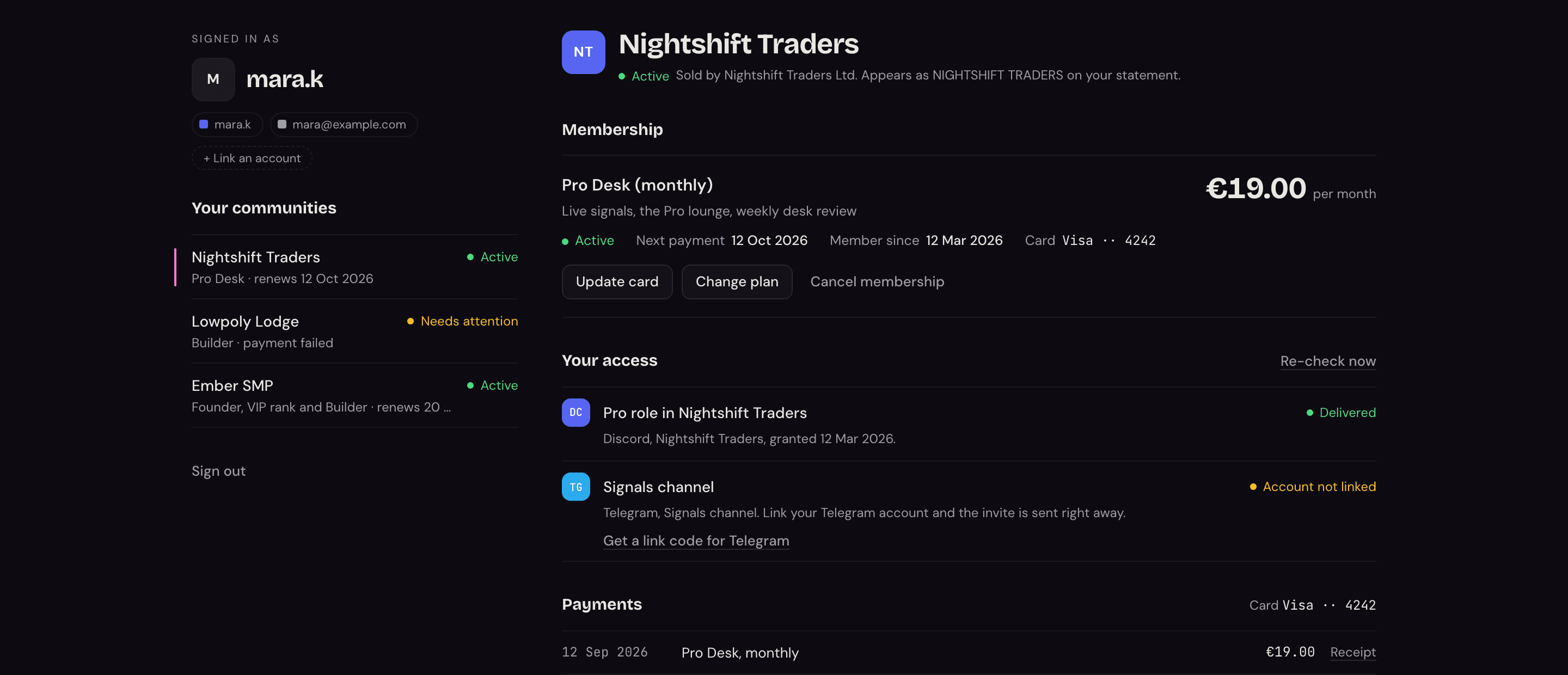
- Membership: plan, price and interval, next payment or end date, member since, and the card on file. Actions: update card, change plan, keep or cancel a scheduled plan change, cancel membership.
- One-time purchases with their access window.
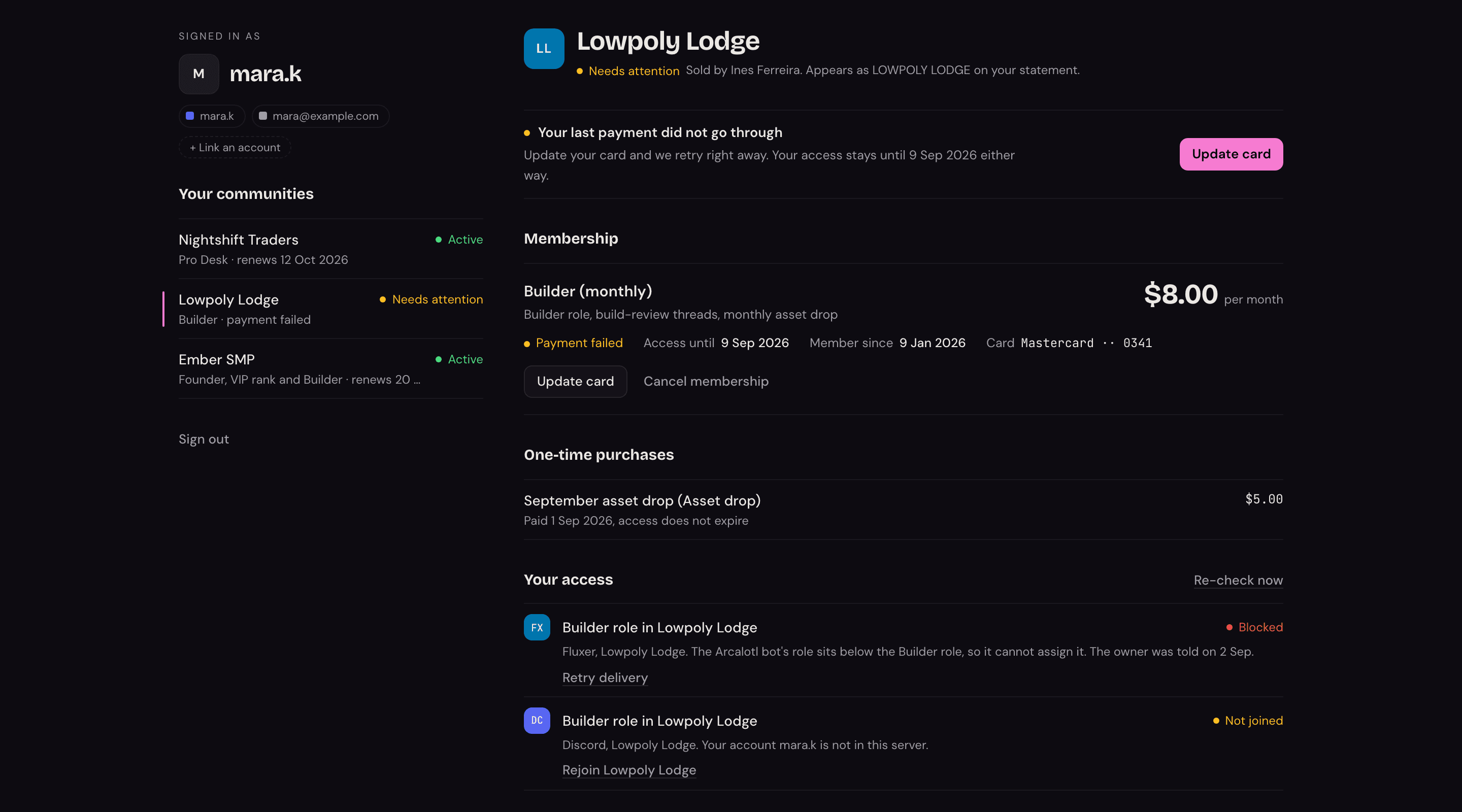
- Your access: one row per entitlement benefit with its state. Delivered rows show when access was granted. Blocked rows explain why in plain words (for example the bot's role sits below the paid role) and offer a retry. Members who left your server get a rejoin link. Members whose account on a platform is not linked yet get a link action.
- Payments: invoices from your connected Stripe account with a receipt link for each.
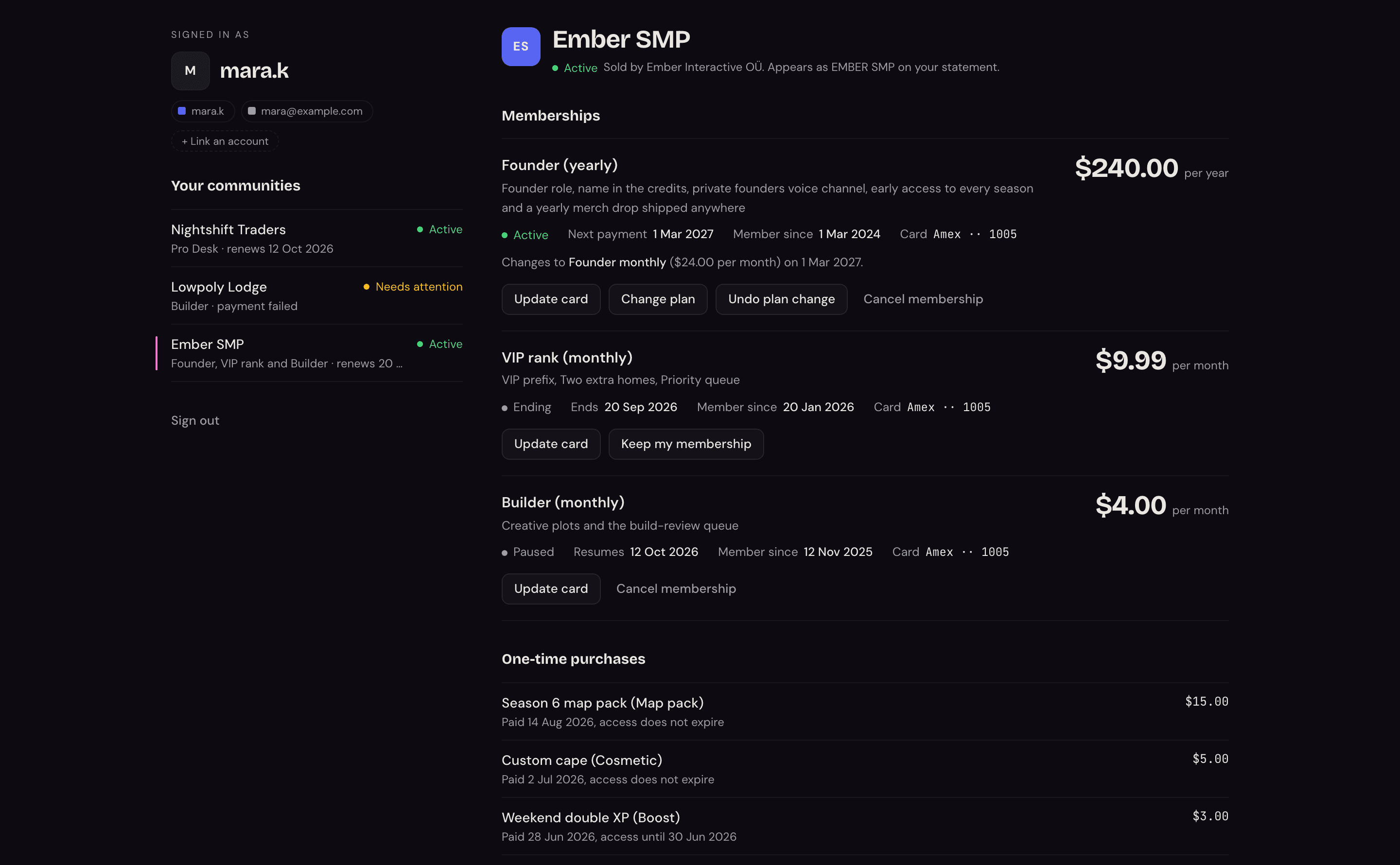
The header names you as the seller and spells out the statement descriptor exactly as it appears on the member's bank statement. Those two lines are the ones that prevent disputes.
When something needs the member, the page says so at the top and next to the row it concerns: a failed payment with the card action, a blocked role with the reason and a retry, a server the member has not joined with a rejoin link.
Cancelling
The cancel flow on the web is your existing cancel-save flow. The member picks a reason, sees the one offer your settings produce for their tenure, and either keeps the membership at the offer or cancels at the end of the paid period. Declining is always a plain link, never hidden or disabled. Both the bot and the portal write the same records, so save rates and recovery attribution in your dashboard stay whole.

Members who have a scheduled cancellation see when access ends and can reactivate any time before then.
Cards and invoices
Updating a card opens a Stripe page configured by Arcalotl on your connected account. It allows payment method updates and invoice history only. Cancelling and plan changes are switched off there, so a member cannot bypass your save offer through Stripe. Stripe returns the member to the portal when they are done.
Arcalotl emails a receipt on every successful payment, naming you as the seller and linking back here. See Receipt Emails for the copy and a preview. Keep Stripe's own customer receipts off for the connected account to avoid sending two.
Linking accounts
A member signed in with one identity can link another from the portal. Discord, Fluxer, Telegram, and Stoat are proven in the browser; the portal then attaches the new identity to every membership in the session, exactly as a redeemed member-link code does in the bot. Stoat and game servers have no web sign-in, so the access list offers a link code to run in the bot instead.
What you need to do
Nothing. The portal is on for every community. Availability of the Discord and Fluxer sign-in doors depends on the operator's application configuration; the email door needs product email to be enabled on the platform. The bot links work regardless.
Set Your Members' Language
Pick the language your bot, checkout, storefront and receipts speak, decide whether Arcalotl follows each member's own language, and see what stays in your words.
Receipt Emails
The receipt Arcalotl emails a member after every successful payment, when it goes out, what it says, and how it looks.